Video conferencing setup
Are you a business that has the option of working remote? You can easily connect Bookedin to your Zoom, Skype or any other virtual meeting app, then invite your clients to book and pay for virtual appointments online. Here's how to set this up:
Step 1: Set up Your Video Conferencing App
- Set up an account using one of the popular online meeting apps. Ex Zoom, Skype, Google Meet etc.
- Create a new meeting or event. Name it the same as your Bookedin service ex, "1-on-1 Coaching"
- Locate the meeting invitation link and click Copy.
Step 2. Paste your link into Bookedin
There's two different ways to add video conferencing in Bookedin:
Option A: Add to services
This will add your virtual meeting link to all appointments booked for a specific service.
- Log into Bookedin web or the mobile app for iPhone or Android.
- Go to Settings > Services then click to edit any individual service.
- On the edit service screen, click or tap Video Conferencing
- Paste the video conferencing link you just copied from Zoom/Skype etc.
- Hit save and voila! Now all clients that book that service can easily join a video call for their appointment. They'll see the link in the automatic confirmation and reminders sent by Bookedin.
- Optional: repeat the above steps for any other services.
Option B: Manually add to individual appointments
This is helpful if you originally planned to meet in person, but have to switch to a virtual meeting randomly due to illness or unforeseen circumstance.
- Go to your Calendar
- Click or tap any appointment, then tap Change.
-
Click Add video conferencing
-
Now paste the link or invite that you copied from Zoom, Skype etc. If you aren't seeing this option, click here to learn how to enable it.
Video conferencing: what clients will see
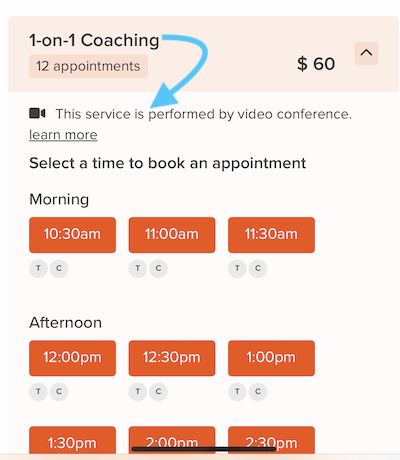
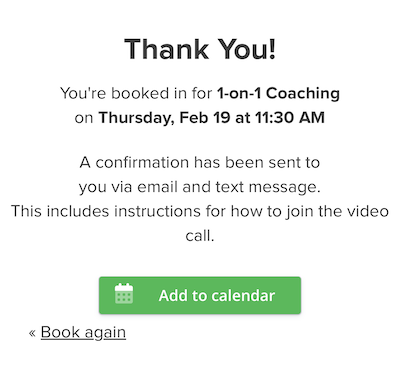
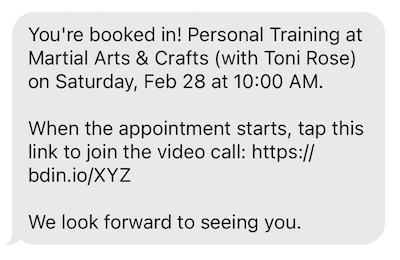
A video icon will appear on your services and clients can easily book & join the call via the confirmation or reminder.
Online booking page:
Thank you page:
Confirmation & reminder texts:
Confirmation & reminder emails:
Note: At this time, the video conferencing feature is only available for appointments in Bookedin. Not classes or workshops. If you're interested in us adding a class video conferencing option, please give us a shout!
Comments